Clarity Console™ Website Content Management Solutions
Easily update your website content anytime, anywhere
The Clarity Console is a powerful, flexible web content management system that gives non-technical users the power to update their website anytime from any Internet enabled computer. Select from more than 30 standard solutions or we can create a custom tool to meet your business needs. A partial list of tools follows:
-
Blog Editor
Add fresh content to your site to keep customers and prospects interested and to stake your claim as an expert in your field.
-
Bulb Calculator
Users can quickly determine how many bulbs they will need for a rectangular or square area in their landscape. -
Calendar of Events Manager
Add company and industry related events to your online calendar to improve customer communication. -
Career Opportunities Manager
Control recruiting costs and improve candidate prequalification with online job postings.
-
Catalog / Marketing Materials Request Editor
Make it easy for your customers to request one of your print catalogs or other marketing pieces. -
Catalog Request Editor
-
Catalog Wizard
With Catalog Wizard™, you can quickly create custom catalogs from plant or product data you have entered into an online Clarity Console™ database. Enter and update information until the last moment - right before you click "Make My Catalog"
-
Client List Editor
This tool allows staff to create profiles of your clients/customers. -
Discount Manager
You can create an unlimited number of discounts for your on-line sales. Discount codes can be for a specific customer or for all customers. Start and stop dates automatically ensure your discounts are being offered at the appropriate time. -
File Downloads Manager
This is a great way to quickly add large amounts of existing information to your site. -
Frequently Asked Questions Editor
Improve customer service by providing online answers to your customers questions. -
Get Notified When Item is Back in Stock
Find out who is interested in purchasing an item currently out of stock so you can better plan order replenishment.
-
Gift Certificates - Online Purchase and Redemption
Gift certificate and gift card usage have been on a steady increase for years. Don't miss out on the opportunity to increase sales with online gift certificate purchases.
You can add the ability for your customers to purchase online gift certificates or gift cards and then have them redeemable at your physical location or through your Clarity Connect shopping cart.
The buyer's credit card is charged when they confirm their purchase, so you have your money immediately. This can help cash flow in the off-season when your sales may be down and people are looking for gifts for their gardening friends and family.
-
Home Page Editor
Your Grower Website home page options are limitless. In addition to 9 different website headers and 6 different website footers, you have 15 different website content options you can toggle on and off and reorganize to draw attention to the most important home page content.
-
Home Page Header and Footer Selector
Select from 9 different header options and 6 different footer options to meet your business needs. You can change them anytime, even after your new site is live.
-
Label Wizard
Use Label Wizard to quickly, easily and cost effectively create labels from your Clarity Console Plant Database Manager or Product Database Manager. It's a great way to leverage your data for the website and for product labels. -
Locations Editor
Use the Locations Manager to enter contact information for one or more of your locations. You can easily update all of your contact information including directions, hours of operations, etc.
-
Mulch & Soil Calculator
Site visitors can enter the dimensions of the area they need mulch or soil for and the desired depth (2", 3", 4", etc.) and the total cubic yards required will be calculated. -
Page Generator Editor
The Page Generator Editor (PGE) tool allows you to create totally dynamic web pages and subpages.
-
Pages Editor
Easily add general content and images to your site with the Pages Editor.
-
Photo Gallery Manager
The tool allows you to enter pictures and create categories to organize into specific "scrap books." . -
Plant Calculator
Users can quickly determine how many plants they will need for a rectangular or square area in their landscape. -
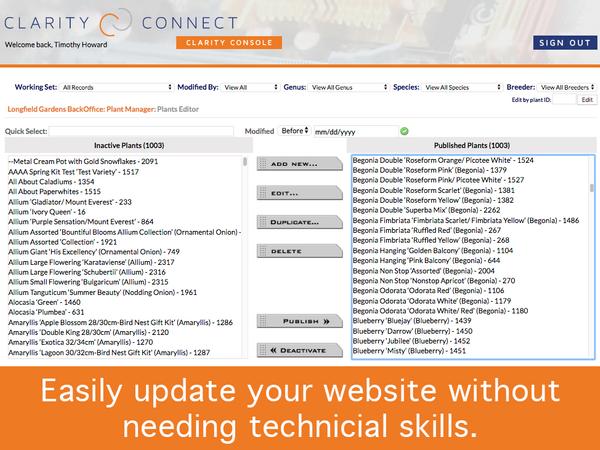
Plant Database Manager: Plant Editor
Add all of the information your customers need to make a purchase decision for all the plants you sell.
-
Plant Database Mgr: Breeder/Program Mgr.
Add as many breeders or programs as you need and then you can associate a plant record with one to help promote and sell plants in that program or from a particular breeder.
-
Plant Database Mgr: Categories/Types Editor
Create as many high-level plant categories as you need to help organize your plant library.
-
Plant Database Mgr: Characteristics Editor
You have complete control to add unlimited Characteristics, like 'Sun Requirement' and corresponding attributes like 'Full Sun', 'Part Sun', 'Shade'. Simply click on the relevant attributes for each plant and the information will be immediately associated with that plant record.
-
Plant Database Mgr: Current Crop Uploader
The Current Crop Uploader is phone-friendly website functionality added to your Clarity Console™ Plant Database Manager. This allows you to use your smartphone or tablet connected to the Internet to take current crop pictures and quickly upload them to the appropriate plant SKU (sellable size) on your website
-
Plant Database Mgr: Custom Plant Index Page Creator
Create custom pages of selected plants to promote through social media, e-newsletters and calls to action (CTAs) on your website.
-
Plant Database Mgr: Custom Settings Editor
Easily control key variables to expedite creating and updating your plant library.
-
Plant Database Mgr: Detailed Plant Search
A detailed plant search is included with th Clarity Console™ Plant Database. Site visitors can quickly find plants that meet their search requirements.
-
Plant Database Mgr: Genus Overview Editor
Quickly add 'Genus' or 'Genus Species' specific information to all of the relevant plant records in your Plant Database Manager.
-
Plant Database Mgr: Plant Image List
Quickly find plant records without images, captions or a proper bloom color selected.
-
Plant Library
-
Plant Pre-Book Ordering
Help smooth your production planning and improve customer service with the GWS plant pre-book ordering system.
-
Pop-Up Creator
You can easily add a pop-up Call to Action to select pages of your site to ensure your customers see timely information.
-
Portfolio Manager
The tool is a great way to organize and display your online portfolio. -
Product Database Manager
Keep all of your products (SKUs) marketing, commerce and logistics information up to date on your site.
-
Product Database Manager: Categories/Departments Editor
-
Product Database Manager: Characteristics Editor
-
Product Database Manager: Image List
-
Product Database Manager: Manufacturers Manager
-
Project Plant Lists
After logging in, your customers can create their own custom plant lists for their landscaping jobs, future orders, or other marketing.
-
Quick Order
If you're customers know what they want, the Quick Order is a great way for them to quickly place their order on your website. They can scroll through to find the plant they're looking for or use the Quick Search to immediately find the plant they want to purchase. -
Random Image Manager
Keep your site looking fresh and updated with the Random Image Manager. -
Recipe Editor
Quickly add great recipes to your site to promote your restaurant, ingredients or products. -
Recommended Orders
Recommended Orders is new functionality we developed based on requests from growers that sell to Garden Centers. They want to put together a list of recommended plants to create suggested orders for various scenarios.
-
Resources and Links Editor
Use the Resources and Links Editor to quickly create links to other interesting sites and resources. -
Shopping List
After viewing plants online, users can easily add items to their shopping list to bring into the garden center. -
Slide Show Editor
Easily add dynamic content for your home page with the Slide Show Editor.
-
Specials Editor
Publish online specials to help promote your business. -
Staff Profiles Editor
Show off your wonderful staff with the Management/Employee Profiles Editor. -
Staff Profiles Editor
-
Store Manager: Incomplete Orders
Quickly see and manage all of your incomplete orders in this easy-to-use interface.
-
Store Manager: Shipping and Boxes Editor
Use this tool to configure your shipping and boxes to help ensure accurate shipping rates are calculated for your customers in your shopping cart.
-
Store Manger: Sales Tax Editor
You can easily update tax rates by state (not by municipality, county, etc.) with your Tax Rate Editor.
-
Store Mgr: Store Variables Editor
You have control over many aspects of your store checkout process via the Store Variables Editor.
-
Testimonials Manager
The best salespeople are satisfied customers. Use the Testimonials Manager to let your customers' praises sell your products and services. -
Ticker Message Editor
The tool allows you to create messages such as taglines and slogans, that can be randomly displayed throughout your site. -
Tips and Helpful Hints Manager
The tool gives you the ability to quickly add tips and hints to your site. -
User Manager
This tool controls access to areas of your site that require logins. -
Video Manager
Easily embed YouTube videos to your site and organize them into albums if needed.
-
Website Email Address Editor
-
Website Header and Footer Selector
-
Where to Buy / Find a Retailer
A quick zip code lookup allows customers to quickly find locations where they can purchase your plants and products.