
Plant Database Mgr: Current Crop Photos - Bulk Uploads
Current Crop Photos can be uploaded one at a time via a smart phone, however there are times where bulk uploading may be more efficient.
Overview
The key to associating a current crop image with the proper variety and size is the SKU ID. Each plant SKU has a unique numeric value the system automatically assigns when new SKUs are created. The system starts with the number 1 and increments each new SKU by 1. If a SKU is deleted, the corresponding SKU ID will NOT be used again. You can find the appropriate value in the Plant Editor on the SKU Tab:
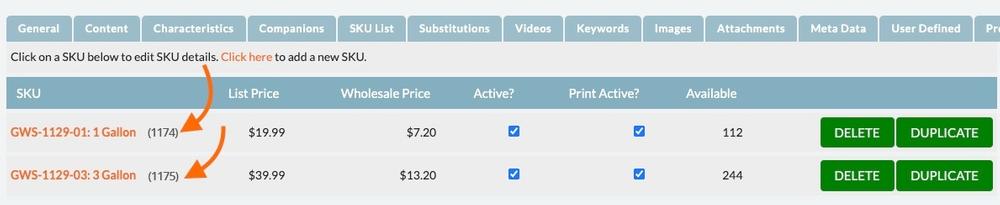
Renaming your current crop image file names to start with the SKU ID followed by a dash and no spaces will allow for bulk upload of current crop photos. For example, if this is your original image name, IMG_1480.jpg, and the ID of the corresponding plant SKU is 1175, you would rename the image to 1175-IMG_1480.JPG.
Bulk Upload Renamed Images to FTP Server
Once all the image files have been renamed, you will upload them to a designated folder on the Clarity Connect FTP server.
Once each night, the system will automatically upload any new, properly named files, to the appropriate Current Crop Image ‘slot’. The system will use the upload date as the photo date.

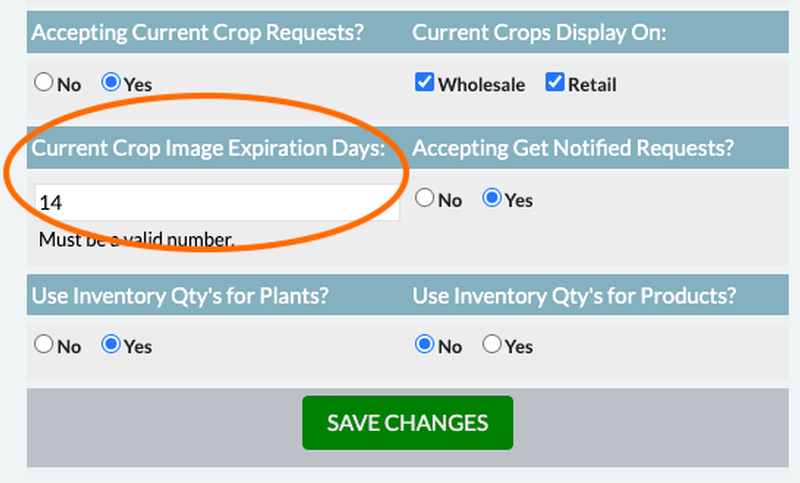
The Current Crop Expiration date will automatically be set as the day of the upload + the number of days in your plant variables:
Seeing is Believing
Your wholesale grower website deserves more than just a template—it deserves a solution built uniquely for you. Our platform transforms how growers present their products, connect with buyers, and grow their business.
Unlock the Power of Grower Website Solutions – Start with a Demo
Join us for a free, one-on-one live demo and see firsthand how our solutions stand apart. You’ll experience the features, functionality, and fresh design that make our websites truly unique. Don’t just take our word for it—see it in action.
Schedule FREE Demo